A User-Centric Approach to Different Models of Document Version History

Document version history is a crucial aspect of any collaborative workflow, enabling users to track changes, revert to previous versions, and maintain a clear record of a document's evolution. However, with various models available, it can be challenging to determine which approach best suits your team's needs. It's important to consider the user's needs and how different models can impact their experience.
In this article, we'll shift our focus to the user-centric aspects of document version history, exploring three distinct models: versions as copies, versions as copies with connections, and versions as history within the document. By analyzing these models through the lens of user requirements, we aim to provide valuable insights into their strengths and weaknesses, helping you make an informed decision when choosing a version management system that best serves your users.
Versions as Copies

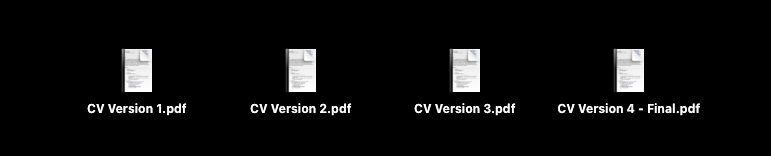
In this model, users create a new version by duplicating the document and adding version information to the copy. Although this may not seem like a version history from the system's perspective, it is the most popular approach among users. You have likely used this method yourself, creating copied files with added information like "Final Version." This approach is familiar and easy to understand, allowing users to manage and control their versions independently.
Use Cases:
- Personal projects or documents where user control and simplicity are prioritized
- MVP stages of a project
- Situations where version management is not a critical requirement
Versions as Copies with Connections
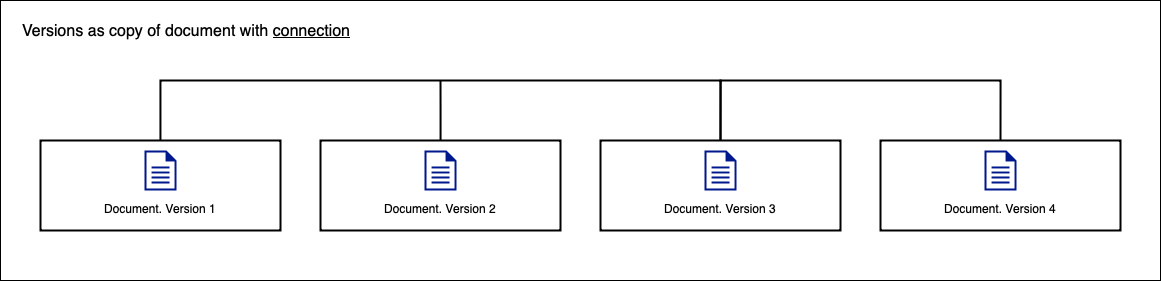
This model builds upon the "Versions as Copies" approach by introducing connections between the duplicated documents. When a user creates a new version, the system maintains a link to the previous version, enabling easier navigation and the ability to reflect changes across connected versions. However, this added functionality comes with increased complexity in handling corner cases and implementation.
Use Cases:
- Collaborative projects where you need to give access to different versions at the same time
- Scenarios that require granular control over version editing and status management
- Projects with complex version dependencies
Versions as History within the Document
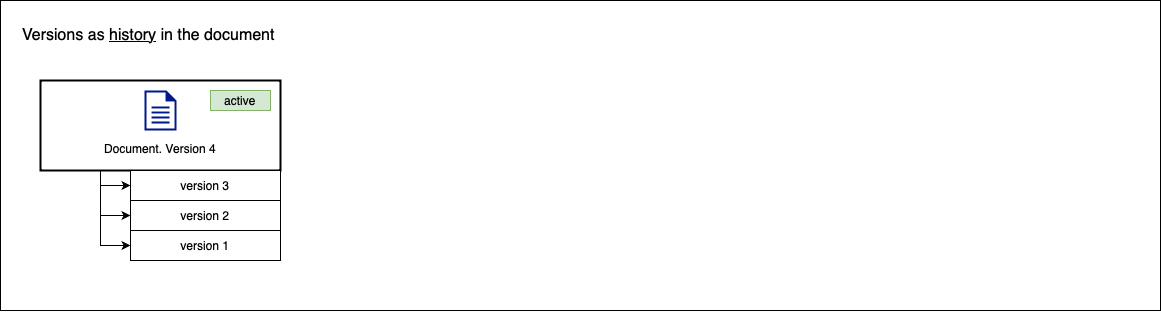
In this model, version history is maintained within the document itself, allowing users to access and manage previous versions directly from the current document. Users can easily restore earlier versions, and the system can automatically create new versions based on user actions or time intervals. This approach provides a clear and centralized version management structure, but limits status and editing control to the latest version only.
Use Cases:
- Projects with a strong focus on version tracking and auditing
- Situations where users need quick access to previous versions for reference or restoration
- Documents that benefit from automated version creation based on user actions or time intervals
Comparison Table:
| Copies | Connections | History | |
|---|---|---|---|
| Quick and easy implementation | Not needed to implement | Requires detailed step-by-step focus | Requires detailed step-by-step focus |
| Each version requires its own change history | Can be applied | Can be applied | Cannot be applied (serves as change history itself) |
| Users need to navigate easily between versions | Depends on user's organization | Links and navigation can be applied | Links and navigation can be applied |
| Granular control over version editing | Each version can be edited | Each version can be edited | Not recommended (may lose version history meaning) |
| Changes made in one version reflected in others | Manual update only | Can be applied | Not recommended (may lose version history meaning) |
| Users need to quickly restore previous versions | Easy access, but user may get lost without own system | Cannot restore, but file statuses can show up-to-date version | Yes |
| Automatic version creation based on user actions | No, manual copy-paste only | Can be applied | Can be applied |
| Automatic version creation based on time intervals | No, manual copy-paste only | Can be applied | Can be applied |
| Consistency | No, user will have own system | Yes | Yes |
Conclusion:
When selecting a document version history model, you need to consider the specific needs of your users and the requirements of your project. Each model has its own strengths and weaknesses, making it suitable for different scenarios.